Compare the best software for filing the Texas RRC P-18 in 2026 — Joltly, SitePro, PakEnergy, OGsys, Enertia, and LoneSTAR. Honest buyer's guide for SWD operators.
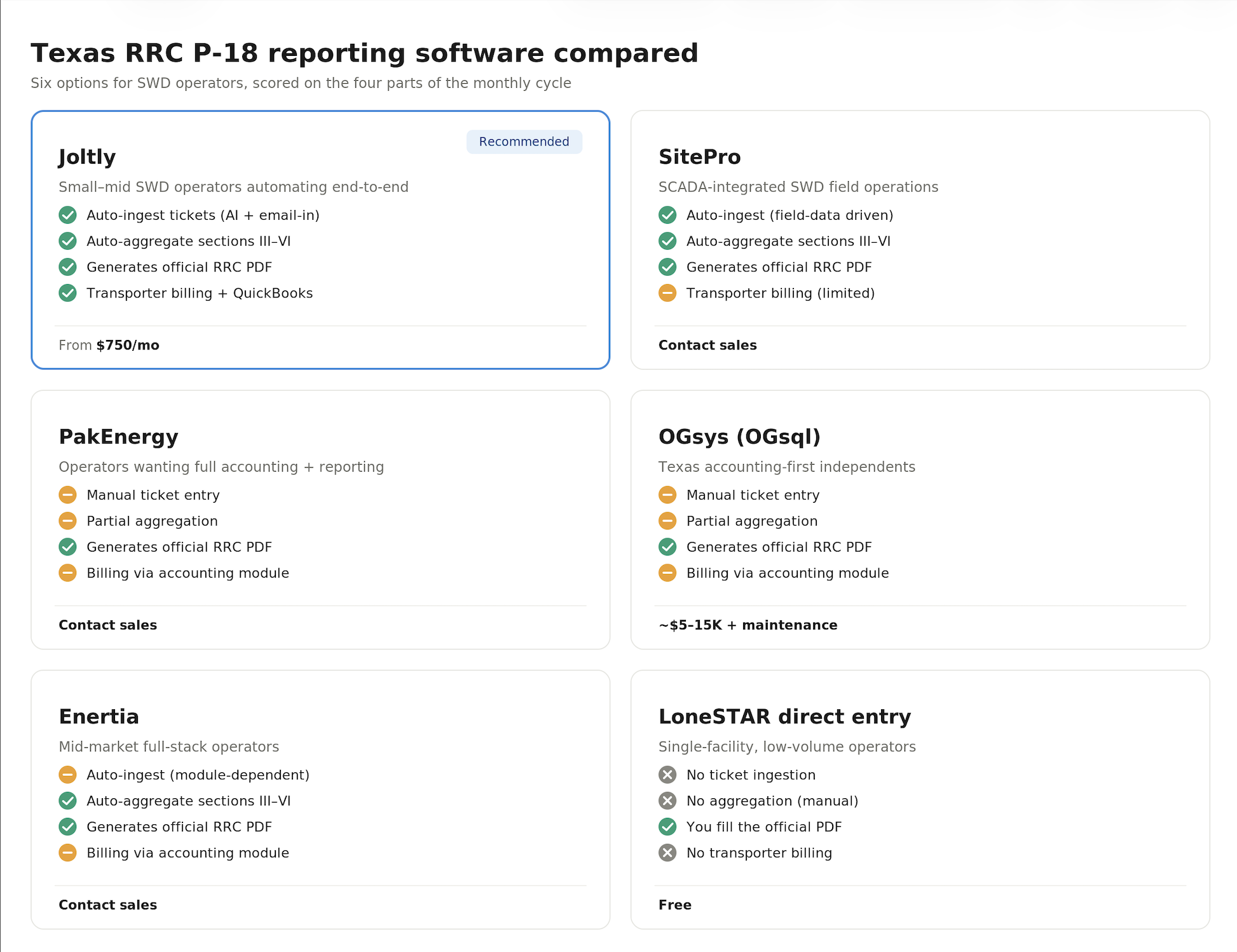


Here is our list of the best software for filing the Texas RRC Form P-18 if you operate a saltwater disposal facility.
Our team evaluated the platforms operators actually use to handle the monthly P-18 cycle — ingestion of field tickets, reconciliation against operator run statements, the math across Sections III–VI, generating the official PDF, and billing transporters. We also gathered feedback from operators and accountants about what works, what doesn't, and where each tool fits depending on the size of your shop.
Before the list — we're Joltly. We build AI back-office software for oil and gas: invoice automation, AR, and now P-18 reporting. So yeah, we put ourselves at #1. Biased? Absolutely.
That said, we wrote this list because we live in this category and have opinions about every tool in it. If you'd rather skip the comparison, you can book a call with our team and we'll tell you which tool actually fits your operation — even if it's not us.
You probably need a real tool — not just a spreadsheet — if any of these are true:
If you have one facility, light volume, and a meticulous office manager, LoneSTAR direct entry plus a clean Excel workbook is genuinely fine. Everyone else is leaving hours on the table every month.
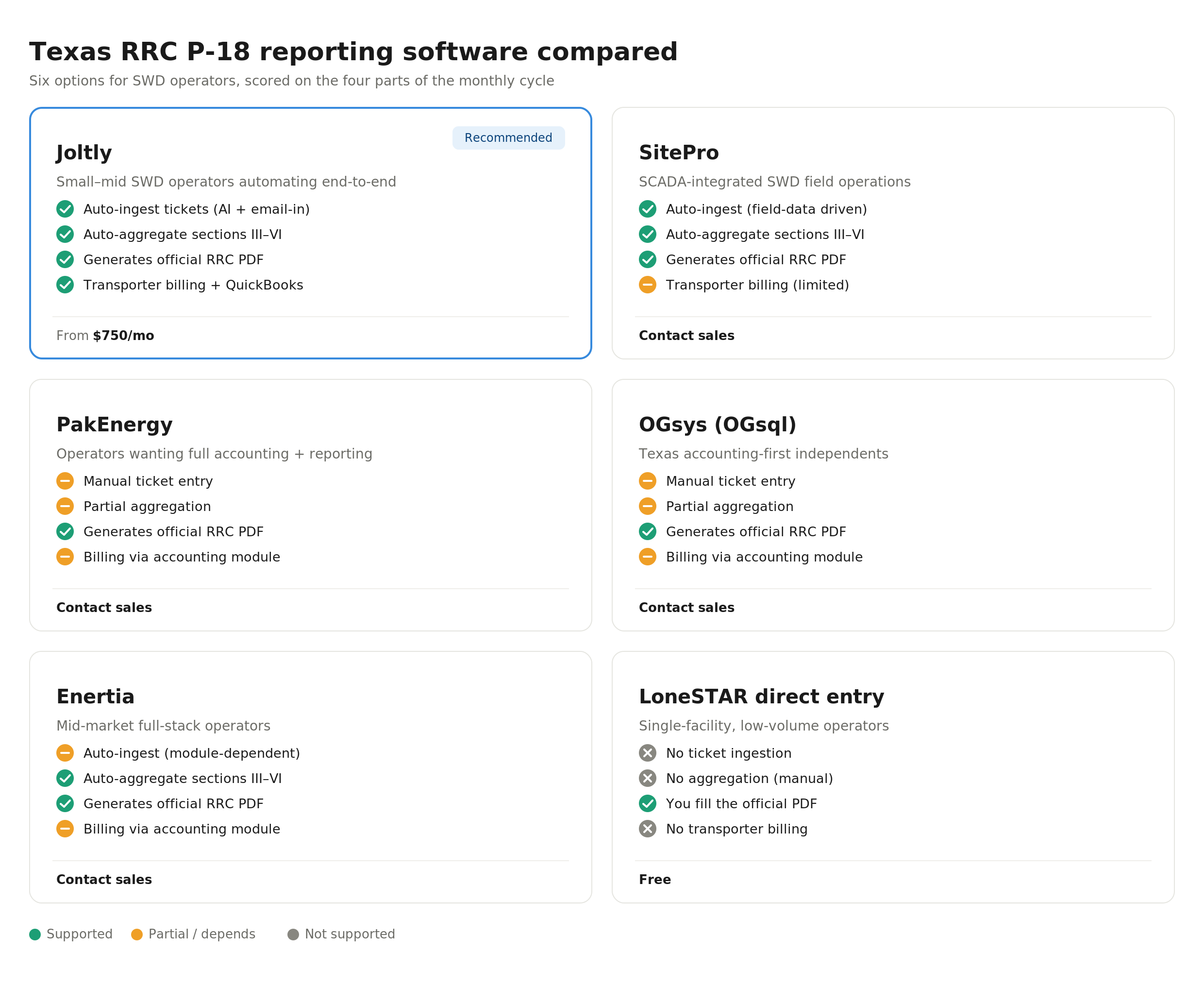
Insert chart image hereUpload p18-software-comparison.png through Webflow's image tool and place it in this spot. Caption suggestion: "How the six P-18 options compare across the four parts of the monthly cycle."
Joltly is an AI-powered back-office platform built specifically for oil and gas. Our SWD module handles the full P-18 cycle — operators forward field tickets and operator run statements to a custom inbox, our AI extracts and dedupes them, classifies water type, allocates across producing leases, and generates the filled PDF on the official RRC template. Transporter invoices are generated from the same data and synced to QuickBooks.
What we're not is a full GL/JIB accounting system. Joltly connects to the system you already have (Quorum, QuickBooks, etc.) instead of replacing it. So if you've got accounting working and you just want the P-18 and transporter-billing pain to disappear, that's where we fit.
Our team built the SWD module after running family operations ourselves and getting tired of doing P-18s in Excel. Pricing starts at $750/month. Book a call with our team to see if it's a fit.
URL: joltly.io
SitePro is the closest thing the P-18 category has to an incumbent. They've put out more SWD-focused content than anyone else in the space, and their platform is strongest at field operations — real-time tank levels, automation, and SCADA for water-handling assets. The P-18 module reads from those data feeds, which is great if you're already on SitePro and a stretch if you aren't.
Our take: best fit for larger SWD operators who want their reporting to live inside the same platform that runs their facilities. Smaller shops sometimes describe it as more capability — and more cost — than they need just to file P-18 each month.
URL: sitepro.com
PakEnergy is one of the long-standing names in Texas oil and gas accounting. RRC filings, including PR and P-18, sit inside their broader accounting suite alongside JIB, AFE, revenue, and severance tax. The pitch is one system of record across accounting and regulatory.
The trade-off is that the SWD-specific automation — bulk OCR, email-in ingestion, auto-allocation — isn't really their focus. Operators usually land on PakEnergy because they need the accounting modules, with P-18 along for the ride. As far as we can tell, the product also doesn't play super nice with outside software.
URL: pakenergy.com
OGsys (now under Quorum) has a long track record with Texas independents. PR e-filing and severance tax are strong, and small-to-midsize Texas operators have used OGsql for decades. SWD-specific automation isn't the focus, though — this is an accounting tool that does P-18, not a P-18 tool that does accounting.
Worth a look if you want something proven, Texas-focused, and don't mind a power-user interface. Joltly also has a native integration with OGsys, so you can keep OGsql as your accounting system and let Joltly handle the AP, AR, and P-18 layer on top.
URL: ogsys.com
Enertia is the heavier all-in-one option for mid-market operators who've outgrown small-shop accounting tools. P-18 lives inside their broader regulatory module. Strong on integration depth and reporting flexibility, less strong on getting up and running quickly — implementation timelines of six to twelve months are common.
Our take: probably overkill for a single-facility SWD shop, fine fit for an operator running a few hundred wells plus disposal and wanting one platform for everything.
URL: enertiasoftware.com
The Railroad Commission's own LoneSTAR portal will accept a P-18 you typed in by hand — no software required. For one facility, low ticket volume, and a clean Excel workbook that doesn't break, this is a perfectly reasonable answer.
Where it falls apart: anything beyond a single facility. Direct entry doesn't validate inventory continuity, doesn't aggregate from underlying tickets, and doesn't help you reconcile the operator run statement — which is where most rejections originate. Free is the right price for a tool that doesn't do those things.
URL: rrc.texas.gov/oil-and-gas/rrc-lonestar/
Form P-18, the Skim Oil/Condensate Report, is the monthly report SWD facility operators file with the Texas Railroad Commission to document water received, water disposed, and any skim oil or condensate recovered.
If you're trying to figure out what tool actually fits your shop, we're happy to help — even if it's not us. Joltly integrates with platforms like Quorum and QuickBooks, so you can modernize the P-18 and AP/AR layer without replacing your core accounting.
Book a 30-min call with our team and we'll walk through your current process and tell you what we'd actually recommend.
Last reviewed: May 2026. Pricing and capabilities change — verify with vendors before purchasing.
Get quick answers to common queries in our FAQs.


You only pay for what you use — no seat fees and no modules you don't need. Pricing is a monthly platform fee plus usage on documents processed, ACH payments, mailed checks, and the workflows you turn on. We size it to your actual monthly close so it scales with the work, not your headcount.
A smaller operator running 25 documents, 10 ACH payments, and 2 mailed checks a month would be priced on that exact volume. A larger operator at 100 documents, 50 ACH payments, and 10 checks pays predictably more. You always know what you're spending because it tracks the actual close.
Joltly connects directly to QuickBooks and Quorum On-Demand Accounting, and supports file-based export workflows for systems like PakEnergy and Integra. It manages accounts, items, vendors, partner mappings, JIB clearing, revenue liabilities, and netting accounts inside your existing setup.
Both sides of settlement. On expenses: invoice review, GL coding, approvals, JIB creation, ACH and check payments. On revenue: statement OCR, partner distributions, remittance emails, and netting between JIB receivables and revenue payouts — so your team replaces spreadsheet work and email follow-up during close.
Yes. Your wells, partners, revenue interests, GL mappings, approval flow, export formats, and partner-facing statements are configured per operator. Most customers go live on their existing chart of accounts and ERP setup — no rebuild required.
Faster than most teams expect. Your AP workflow can be live in less than a week — and you don't need to change your current accounting system. Revenue typically takes about two weeks. The only thing we need from you is a sample revenue statement so we can train the AI on your format.
We set up a Microsoft Teams channel or email channel for your team — whichever you prefer. You'll also get the founders' phone numbers for text messaging when you need a fast answer.